

The new tpg app: your journeys and tickets at your fingertips
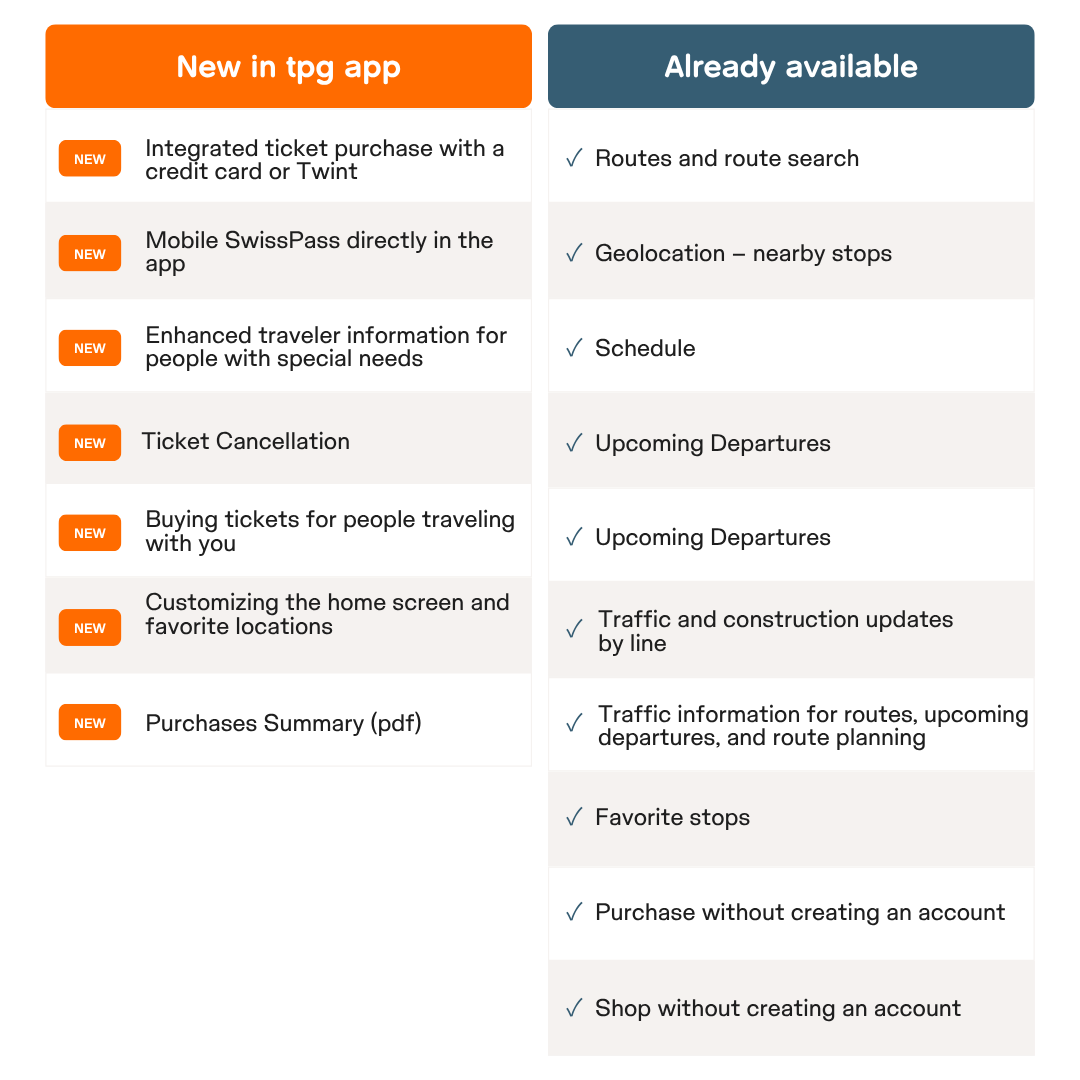
The new tpg app accompanies you on your daily journeys. Find below the new features of tpg app, presented at a glance.
Download the latest version of tpg app

| 
|
Tutorial “Purchase”
Discover the main features for purchasing transport tickets in the tpg app in this tutorial.
Travel with the tpg app
One single tpg app for travelling on the network: real-time timetables, route planning, traffic information and ticket purchases, it's all there! Organize your travels with complete freedom, wherever you are, and make your life easier.
Whether you travel regularly or occasionally, the tpg app shows you the next departures nearby, the duration of journeys and possible connections, directly on your smartphone. You can also buy your tickets in a few clicks, by credit card, directly from app. You can also display your digital SwissPass directly and securely on your app.
With tpg app, you save time, enjoy peace of mind and comfort on every journey.
Download the new version of tpg app now and enjoy the new features to make your travels in Geneva and the surrounding area easier.
|
|
|

What's changing with the new tpg app

Clear and modern navigation
The interface has been completely modernized to improve ergonomics and readability. Essential information (schedules, routes, tickets) is easy to find, with a simplified structure and intuitive menus.

An integrated and simplified ticketing system
The purchase of digital tickets is now fully integrated into the application, with direct payment by bank card (credit card, TWINT, PostFinance Pay, Apple Pay, Google Pay...). You can buy, store and present your travel tickets directly from your smartphone, without needing a physical medium.

SwissPass mobile
The SwissPass mobile app allows you to display your SwissPass card directly on the tpg app. Your subscription and travel passes are visible at a glance, ready to be presented during an inspection.
Your tpg.shop account also allows you to view your SwissPass mobile Only and renew your travel pass.

Passenger information adapted for people with disabilities
The travel information is adapted for people with reduced mobility (PRM) and allows them to prepare and carry out their journeys on public transport in an autonomous, safe and comfortable manner. The tpg app now allows users to identify accessible stops and vehicles using specific pictograms.

Prospects for steady growth
The tpg app is designed to evolve with regular updates adding new services as customer needs evolve. The goal is to make the tpg app a true everyday mobility assistant.
tpg app features and new features in brief
Any questions? Check out the FAQ for the new tpg app
-
Features
-
What are the features of the tpg app?
- The purchase of an e-ticket in connected mode or as a guest (without creating an account).
- Door-to-door route search: calculations of routes combining walking, bus, tram, train (Léman Express) and boats (Mouettes genevoises).
- Immediate display on the map of the next departures in real time near your geolocation
- Purchase of tickets: single tickets, day passes for the unireso perimeter (zone 10) and the whole of Greater Geneva (including cross-border zones 200, 230, 240, 250).
- Your Swisspass in your smartphone
- Payment methods (credit card, TWINT, PostFinance Pay, Apple Pay, Google Pay).
- Companion tickets: possibility to buy tickets for other people travelling with you.
- In the More menu, you can access your subscriptions via a link to tpg.shop.
- Cancellation of a ticket within 24 hours of purchase subject to the applicable refund conditions (refer to the section below: Can I get a refund for tickets purchased on the tpg app?).
-
How do I change my display settings on my home screen?
Go to the very bottom of the home screen and tap on "Display Preferences". You can move the modules to have them in a different order or deactivate them so that you don't see them on the home screen.
-
Favorites management
For the next departures (Search for stops), you can enter a stop and press the star on the right before validating it. This favorite will come to the top of the list for later consultations, upcoming departures or route search.
-
Where are the departures of the stops in the area?
They can be found on the home screen under the info "Departures nearby". The dots below allow you to change the nearby stop from the closest to the farthest. You can also scroll to the right to change stops or click on the "Search for stops" button to find departures from other stops.
-
Is the app accessible to people with visual impairments?
An external audit will be sent by Hacon (provider of the tpg app) at the beginning of October 2026 to attest to the accessibility of the app by visually impaired people.
-
What is real time?
Real-time is a timetable which, based on the theoretical timetable, takes into account the vagaries of traffic (demonstrations, accidents, etc.).
-
How do I show the itinerary search?
Route search is available on the home screen at the top. You can specify a stop or a starting address and a stop or an ending address in the specific fields (departure/destination). You can also add one or more "via" after entering the departure and destination. You can also change the characteristics of the journey (date/time, means of transport, etc.) via the buttons below the departure and destination input boxes.
-
Can I put stops as shortcuts when searching for directions?
Yes, by going to the "My Locations" module on the home screen, it is possible to specify a stop or an address as the place of home (home) or work (work). You can also specify any other place and name it in any way you wish. This allows you to search for routes more quickly.
-
Can I register my SwissPass in the app?
Yes, go to the "Tickets" tab of your app under "SwissPass mobile".
Then click on the "Log in with SwissPass" button. If you do not yet have an account with Swisspass.ch, you will first have to create an account by following the steps on the site (choose “I have a public transport travel pass” to indicate your Swisspass card number in the “Customer number” field).
Log in with your Swisspass.ch credentials, click on the "Set up now" button. All you have to do is validate the terms of use and your dematerialized Swisspass is displayed.
Of course these operations have to be carried out only once. You can find your mobile SwissPass at any time in the "Tickets" tab and then under "Mobile SwissPass".
All you have to do is show this screen during a check.
-
What are the features of the tpg app?
-
Purchase
-
What is the product offer available with tpg?
- unireso zone 10 (Tout Genève): tickets (including the skip fee) & day passes
- Léman Pass: tickets (including cross-border hopping) & day passes:
- Multizone 2 zones: Léman Express
- Multizone 3 zones: Léman Express
- Complementary tickets
- Route: by route search. - Local tickets France
- Tickets Swiss direct service:
• Route: by route search only
• City-ticket and City-ticket 2 hours: by route search only.
-
What tickets and cards can I buy?
All the tickets you need to travel on the Greater Geneva network, including the Léman Express, and on the neighboring areas in France. All areas can be accessed via the "More" icon at the bottom of your screen, under "Network Maps".
-
Can I purchase travel passes?
Yes, you can access tpg.shop directly from the "More" tab, under the "Services" section, under the "Travel passes" section or by going to the website tpg.shop.
Subscriptions are also sold in our three agencies in Cornavin, Rive and Lancy-Pont-Rouge. To renew your travel pass, you can go to an agency, our webshop or one of our our retailers.
-
How to buy a ticket or a day pass?
For any ticket purchase, you have two options:
- In the "Tickets" tab, click on "Buy": select the ticket that suits you.
- After searching for a route, you will be offered the appropriate tickets.
You have the option of purchasing in logged in mode via a SwissPass login, or as a guest without creating an account. To issue your ticket, here is the necessary information: title, surname, first name, date of birth and email address.
The payment methods are: credit card, TWINT, PostFinance Pay, Apple Pay, Google Pay.
-
How do I buy a ticket corresponding to an route?
After performing an itinerary search, click on the orange "Tickets" button to select your ticket.
-
Can I buy Léman Express tickets and cards?
Yes, Léman Pass tickets and cards are available on the app.
tpg.shop is ideal for purchasing or renewing your travel passes (annual, monthly, or weekly). You can also go to one of our three agencies (Cornavin, Rive and Lancy-Pont-Rouge) or to one of our retailers. -
How do I buy additional tickets?
In the "Tickets" tab by clicking on the "Buy" button. Then by selecting the "Complementary" category.
You can also buy your tickets after searching for directions. -
Can I buy tickets for other people?
Yes, as long as these people are traveling with you, as the ticket is saved on your smartphone.
In the "Tickets" tab, tap "Buy", choose your category, then click on the "1 person" filter at the top of the screen to add or select a companion. As each ticket is nominative, the title, surname, first name and date of birth of the passenger must be filled in for the on-board inspection.
-
How do I buy a transport ticket for my dog or my bike?
In the immediate future, this is not possible.
-
Can I buy my ticket in advance?
Yes, via route search only, indicating a date and time of travel in the future.
-
Until when can I buy my ticket?
The entire procedure (purchase and confirmation) must be completed before the vehicle leaves. We recommend that you finalize your purchase and make sure you have received your ticket on your phone before boarding.
-
Where can I find the ticket I bought?
You can find it on the "Tickets" tab. The latter is available at all times, including without a network or wifi. You are required to present it in the event of an inspection, with a valid identity document, as the tickets are nominative.
-
Can I pay with a credit card in EUR without commissions being charged?
Yes, for this you must choose to pay in Euros with a Euro credit card.
To avoid bank charges, go to the "More" tab and then to "Profile settings". Click on "Select Currency" where you can choose your currency based on the choices below:- If your credit card is issued by a Swiss institution, choose "Swiss Franc CHF".
- If your credit card is issued by a European organization, choose "Euros €".
-
How long are tickets purchased on the tpg app valid for?
The time of their validity is indicated on each ticket purchased on the application.
-
Can I get a refund for tickets purchased on the tpg app?
If your ticket has not yet started, you can request a refund directly from the app within 24 hours of purchase.
For refund requests for occasional tickets, the conditions of T600.9 apply.
For reference:
-
What is the product offer available with tpg?
-
Compte
-
Pourquoi l’achat de billets nécessite des informations personnelles ?
Selon les prescriptions tarifaires suisses (Tarif 600), tout billet électronique doit obligatoirement comporter la civilité, le nom, le prénom et la date de naissance du voyageur. C’est la raison pour laquelle ces informations sont demandées lors de l’achat. De cette manière, les titres de transport proposés correspondent à votre profil (adulte/jeune/AVS).
Ces données personnelles ne sont pas utilisées à des fins publicitaires.
-
Puis-je modifier mes données personnelles dans tpg ?
Dans le menu « Plus », sous « Paramètres du profil », vous pouvez accéder à vos données personnelles (nom, prénom, date de naissance, adresse). Pour les modifier, cliquez sur « Modifier mes données personnelles », vous serez alors redirigé sur le site Swisspass.ch pour effectuer les modifications souhaitées.
-
J’ai oublié mon mot de passe. Que faire ?
Lors de votre tentative de connexion, vous devez effectuer une réinitialisation du mot de passe en cliquant sur le lien « Mot de passe oublié ? » et suivre les instructions du site Swisspass.ch.
-
Qu’advient-il de mes données personnelles (nom, adresse, etc.) ?
Vous trouverez vos réponses dans nos « Conditions générales de vente et d’utilisation » qui se trouvent dans le menu « Plus » de l’application, sous la rubrique « Informations légales ». Pour en savoir plus sur notre politique de protection des données, cliquez sur ce lien.
-
Dois-je m’enregistrer pour acheter un titre de transport sur l’app tpg ?
Vous avez la possibilité d’acheter en mode connecté via un login SwissPass ou bien en tant qu’invité sans création de compte. Pour un achat en tant qu’invité, voici les informations nécessaires : nom, prénom, date de naissance et e-mail.
-
Lorsque je renseigne mon e-mail pour me connecter à mon compte, le message « La connexion a échoué. Veuillez contrôler vos données » s’affiche.
Cela signifie que votre compte SwissPass n’existe pas. Créez sans attendre votre compte SwissPass dans l’application. En cas d’oubli de mot de passe, consultez dans la rubrique « Compte » la question « J’ai oublié mon mot de passe, que faire ? ».
-
Pourquoi l’achat de billets nécessite des informations personnelles ?
-
e-tickets
-
Que se passe-t-il si mon téléphone n’a plus de batterie lors d’un contrôle et que je ne peux pas présenter mon billet électronique (e-ticket) ?
Tout billet acheté sur l’application tpg est nominatif. Le client doit pouvoir prouver son identité en cas de contrôle.
Les e-tickets (billets achetés sur l’application tpg) sont accessibles en tout temps y compris hors ligne via l’icône « Billets » en bas de l’écran.
Selon le tarif national T600 de l’Alliance SwissPass, vous disposez d’un délai de 10 jours pour présenter votre billet (qui devait être valable au moment du contrôle). Des frais de traitement de CHF 5.00 vous seront demandés. Passé ce délai, les frais de dossier s’élèvent alors à CHF 30.00.
-
Les billets achetés sur l’app tpg sont-ils cessibles ?
Non, les billets achetés sur l’application tpg sont nominatifs et non cessibles. Lors du contrôle des billets, vous devez présenter une pièce d’identité valable (passeport, carte d’identité). En revanche, si vous avez un abonnement, vous n’aurez pas besoin de présenter votre pièce d’identité.
-
Quels documents dois-je présenter lors d’un contrôle ?
Oui, vous pouvez retrouver vos billets en cours de validité même hors réseau et sans wifi dans l’onglet « Billets » sous « Billets actifs ».
Si vous possédez un abonnement, vous pouvez présenter votre SwissPass, dans l’onglet « Billets » sous « SwissPass mobile ». Il vous faudra avoir auparavant enregistré votre SwissPass dans votre application (consultez la question « Puis-je enregistrer mon SwissPass dans l’app ? » plus haut dans la rubrique).
-
Que se passe-t-il si mon téléphone n’a plus de batterie lors d’un contrôle et que je ne peux pas présenter mon billet électronique (e-ticket) ?
-
Localisation
-
L’app ne trouve pas d’arrêts à proximité ?
Pour que tpg puisse utiliser votre position géographique, il est nécessaire d’autoriser l’accès à la localisation de votre téléphone dans ses réglages.
Attention, si vous avez désactivé la localisation, il sera nécessaire de redémarrer tpg pour que l’application puisse réinitialiser votre géolocalisation. Si la localisation est active, faites légèrement bouger la carte ou dézoomez légèrement pour voir la pastille orange symbolisant votre position et les arrêts les plus proches.
-
L’app ne trouve pas d’arrêts à proximité ?
-
Téléchargement
- Où trouver l’application tpg ?
-
Quel environnement supporte l’application tpg ?
Le bon fonctionnement de l’application est garanti sur la version majeure actuelle du système d’exploitation ainsi que sur les deux versions précédentes, aussi bien sur iOS que sur Android.